The EcoFlow Titan 5000 Plus power station isn’t just another battery box; it’s a serious contender for whole-home backup. This unit packs a 5 kWh LiFePO4 battery and an inverter capable of pushing 10,000 watts. We put it through its paces, checking everything from inverter stability to solar charging efficiency. This thing means business.
⚡ Quick Guide: How to Test the EcoFlow Titan Plus in 15 Steps
- Understand the Titan series models.
- Inspect all input and output ports.
- Stress test AC inverter output.
- Verify neutral grounding and capacity.
- Check EMI and simulate home backup.
- Identify all charging cable types.
- Adjust AC charging power via app.
- Confirm pass-through AC output.
- Test X-Fusion overload capability.
- Determine solar MPPT startup voltage.
- Observe MPPT sustained low voltage.
- Verify simultaneous dual input charging.
- Measure solar charging performance.
- Grade the power station performance.
- Review early bird purchase incentives.
📋 In This Article
- Technical Specifications & Components
- Tools & Materials Used — what you will need for this project
- Introducing the EcoFlow Titan Series
- Examining Titan 5000 Plus Ports and Connections
- AC Inverter Stress and UPS Testing
- Neutral Grounding, Usable Capacity, and Standby Drain
- EMI Assessment and Extended Home Backup Simulation
- Overview of Charging Cables and Input Ports
- Adjusting AC Charging Power Settings
- Assessing 240V Charging Voltage Drop and Pass-Through Output
- X-Fusion Pass-Through Overload Capability
- High-Load Pass-Through and MPPT Startup Voltage
- MPPT Controller Startup and Low Voltage Operation
- Dual Charging and Inverter Auto-Restart Functionality
- Real-World Solar Charging Performance
- Grading the Titan 5000 Plus Performance
- Final Thoughts and Early Bird Offers
- FAQ
📊 Technical Specifications & Components
| Model | EcoFlow Titan 5000 Plus |
| Inverter Output Power (Titan Plus) | Up to 10,000W |
| Battery Type | Lithium Iron Phosphate (LiFePO4) |
| Battery Cells | 4160 Tabless 2C type |
| Battery Capacity (Nominal) | 5017 Wh (5 kWh) |
| Battery Nominal Voltage | 204.8 V |
| Battery Nominal Current | 24.5 Ah |
| Battery Expansion | Up to 30 kWh |
| AC Output (Titan Plus/Titan) | 240V Split-Phase |
| AC Output (Titan Classic) | 120V |
| AC Output Power (Titan Plus) | 10,000W |
| AC Output Power (Titan) | 7200W |
| AC Output Power (Titan Classic) | 4000W |
| Solar Input Power (Titan Plus) | 8000W (2x 4000W controllers) |
| Solar Input Power (Titan) | 4000W (1x 4000W controller) |
| Solar Input Power (Titan Classic) | 3200W (1x 3200W controller) |
| Solar Input Voltage Range | 40V to 450V |
| Solar Input Current | Up to 16A per port |
| Solar Charge Controllers | Independent MPPT (2 for Plus, 1 for others) |
| Main AC Output Receptacle (Titan Plus) | 50 Amp |
| Main AC Output Receptacle (Titan) | 30 Amp Twist-Lock |
| Main AC Output Receptacle (Titan Classic) | 30 Amp RV |
| AC Charging Input (Titan Plus, C20) | Up to 1800W (120V) |
| Warranty | 5 years |
| UPS Switchover Time | 7.4 milliseconds |
| THD at Full Load | 0.4% |
| Fan Noise at Max Load | 51 dB (at 3 feet) |
| Exhaust Temperature at Max Load | 105°F (40.5°C) |
| Usable Capacity (Titan Plus) | 4530 Wh (90.2%) |
| Usable Capacity with 1 Expansion Battery | 8930 Wh (88.9%) |
| Inverter Standby Drain | ~0.68% per hour |
| AC Charging Efficiency | ~88.4% |
| MPPT Startup Voltage | 60V |
📊 Project Overview & Costs
🔧 Difficulty Level: Medium
⏱️ Time Investment: DIY: 4-6 hours (initial setup & testing) | Pro: 2-3 hours (initial setup & testing)
💰 Professional Service Cost: $2500-$3500 (unit cost, installation extra)
💡 Verdict: This system offers significant savings compared to traditional whole-home battery setups like the Tesla Powerwall, making robust backup more accessible.
🛠️ Tools & Materials Used
• Noise Meter
• Thermal Imager
• Adjustable DC Power Supply (1200W)
• Electric Heaters
• Guitar Amplifier
• Dirty Electricity Meter
• 10-Circuit Transfer Switch
• CalSun 450W Bifacial Solar Panels
• MC4 Adapters
• 120V AC Charging Cable (C20)
• 240V AC Charging Adapter (from DPU)
• Extension Cord
• Workstation Computer
• Monitor
• Studio Light
• Built-in Wattmeter
Step-by-Step Guide
Introducing the EcoFlow Titan Series
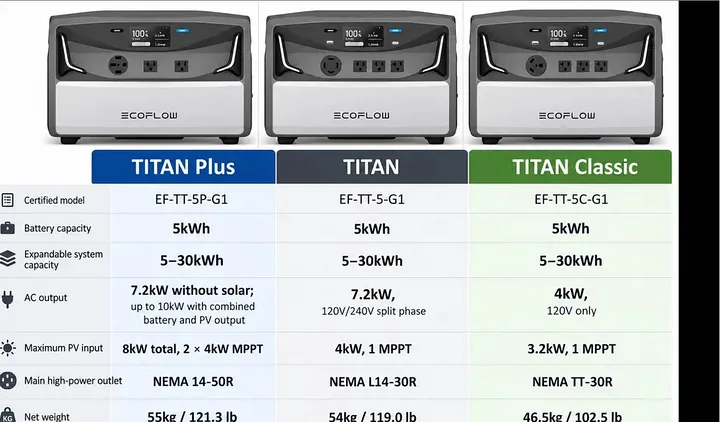
EcoFlow just dropped a new line of power stations, the Titan series. We're looking at the Titan 5000 Plus today, a beast with a 10,000-watt inverter output and a 5 kilowatt-hour LiFePO4 battery. This thing also handles a massive 8,000 watts of solar charging. There are three models: the Titan Plus, the standard Titan, and the Titan Classic. All of them use 5 kWh batteries, specifically the latest 4160 tabless 2C LiFePO4 cells, which is good stuff.
The battery's rated at 5017 watt-hours, running at a high 204.8 volts and 24.5 amp-hours. High voltage means less heat and better efficiency. Every model can expand up to 30 kWh, which is a serious setup.
Now, the AC output is where they really differ. Both the Titan Plus and the standard Titan support 240-volt split-phase output. The Plus model pushes 10,000 watts, while the regular Titan does 7200 watts. The Titan Classic, on the other hand, is a 120-volt, 4000-watt inverter.
Solar charging also changes: the Titan Plus gets two 4000-watt controllers for a total of 8000 watts, the standard Titan has one 4000-watt controller, and the Classic has one 3200-watt controller. Output receptacles vary too: the Plus has a 50-amp connector, the standard Titan a 30-amp twist-lock, and the Classic a 30-amp RV outlet. The Titan Plus is the heaviest of the bunch. No official prices yet, but I'd guess somewhere between $2500 and $3500, depending on the model.
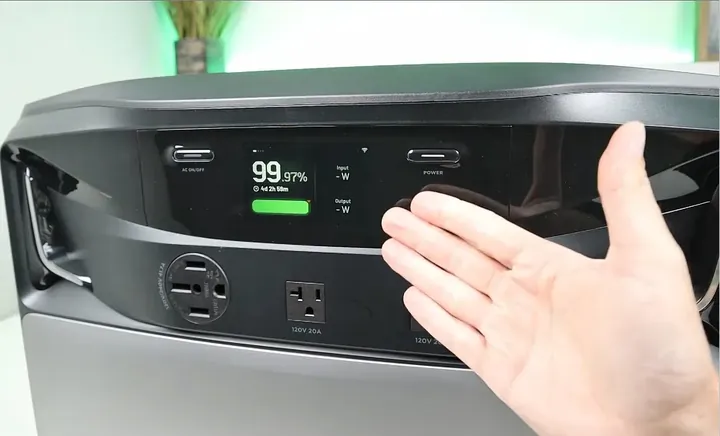
This series is designed as a more affordable, easier-to-install alternative to home battery systems like the Tesla Powerwall. It's a smart move. The display shows a big charge percentage, plus input and output in watts. Hit the power button once for detailed input, again for output, another time for settings, and one more to get back to the main screen. Simple, effective.
Examining Titan 5000 Plus Ports and Connections
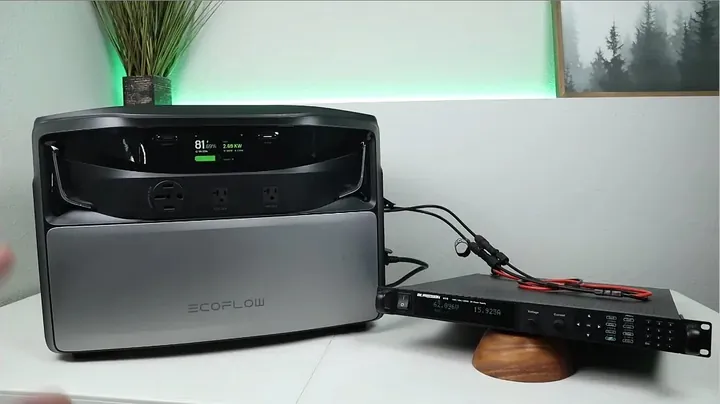
Taking a closer look at the Titan 5000 Plus, the front panel features two standard 120-volt, 20-amp outlets, alongside a beefy 240-volt, 50-amp outlet. Pretty standard stuff for serious power. On the right side, there's a unique port for high-power AC input and output. This is where you'd hook up EcoFlow’s smart panels or charge the unit from a 240-volt grid connection. There's a slider mechanism here; slide it up, and you get a 120-volt charging input.
This slider design is smart, it prevents you from plugging in both 120V and 240V AC inputs at the same time, which would be a bad day. Down below, you'll find the two solar charging ports, each capable of handling 4000 watts for an 8000-watt total. That's a lot of sun. Right at the very bottom, there’s a dedicated port for connecting an expansion battery, so you can stack more juice.
One key thing to notice: the Titan 5000 Plus doesn't have any 12-volt outputs or USB ports. That's a bit of a bummer for smaller gadgets, but the regular Titan and Titan Classic models *do* include two USB ports right below their display buttons. EcoFlow sent me just this Plus version for testing, so the rest of the video dives deep into how this specific unit's inverter and charging systems really perform. I'm hoping by the end, you'll have a clear picture of whether this Titan 5000 Plus is the right fit for your setup.
AC Inverter Stress and UPS Testing
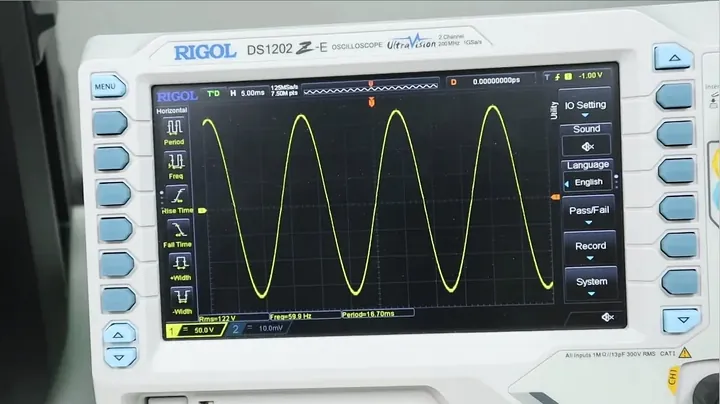
First up, I put the inverter through its paces, pushing it to its claimed maximum continuous load of 7200 watts for a full 15 minutes. The oscilloscope showed a super clean sine wave, rock solid at 122 volts and 60 hertz. My instrument measured the Total Harmonic Distortion (THD) at a mere 0.4% under full load. That's almost perfect. After about 10 minutes at max output, the cooling fans kicked into high gear. I measured the noise at 51 decibels from three feet away, which is audible but not terrible for that kind of power.
A quick thermal scan showed the hottest spot, the right exhaust, hitting 105°F (40.5°C). That's cooler than many other units I’ve tested. It passed. The Titan Plus handled the full 7200-watt load for 15 minutes without a hiccup, no shutdown. This thing is robust.
Next, I cranked up the load past 7200 watts to see where it would finally trip. The inverter peaked at over 10,500 watts before it finally shut down. That's a huge surge capacity before overload protection kicks in. Then came the UPS switchover test, crucial for sensitive gear.
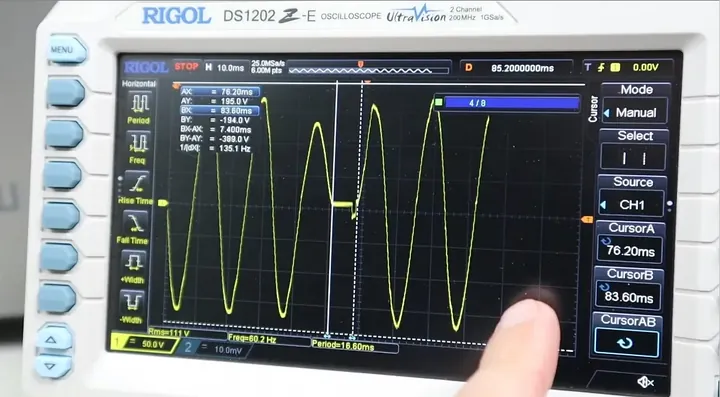
I had my workstation, monitor, and studio light hooked up, with the unit in UPS mode, charging from the wall. My oscilloscope was set to capture the exact moment power dropped. Three, two, one. The computer and monitor stayed on, no flicker. The oscilloscope showed a tiny straight line, indicating the brief moment of power loss. Measuring that, it was just 7.4 milliseconds. That's lightning fast. I did three separate tests to confirm consistent performance. Every time, the computer just kept humming along. This unit is definitely ready for sensitive electronics.
Neutral Grounding, Usable Capacity, and Standby Drain
I wanted to nail down whether this inverter had a floating or grounded neutral. With the inverter on and nothing else connected, my tester showed a floating neutral. That's pretty common for portable units. But as soon as the AC charging cable was plugged in, the neutral became properly grounded, drawing its ground from the charging source. This is exactly what you want for home integration.
Next, I drained the station completely with a constant resistive load to find its true usable capacity. The unit delivered 4530 watt-hours of usable power. That's 90.2% of its advertised 5017 watt-hour nominal capacity, which is well above my target of 85%. That's excellent. Since the Titan 5000 Plus supports expansion batteries, I hooked up one additional module and ran the capacity test again. It yielded 8930 watt-hours, or about 88.9% of the combined nominal capacity.
The battery modules themselves stack up really neatly, and EcoFlow uses these low-profile 90-degree angled cables that keep everything compact. No messy wires here. Finally, I checked the inverter's standby power draw. Starting with a full charge and leaving the inverter on for 12.5 hours, the battery level dropped to 91.45%. That means it used about 9% over that period, or roughly 0.68% per hour. For such a powerful inverter, that's pretty darn efficient. No complaints there.
EMI Assessment and Extended Home Backup Simulation
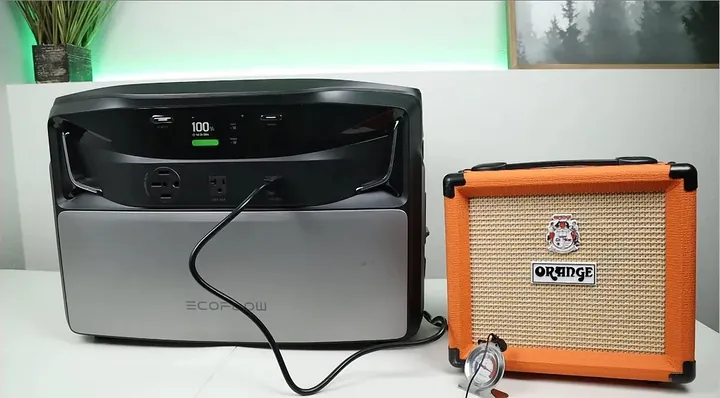
I checked for electromagnetic interference, or 'dirty electricity,' using my meter. It registered 1585 millivolts, which is about average for a power station. But the real test is whether you can hear it. I plugged in a guitar amplifier to the inverter, and honestly, I didn't get any hum or crackle. The output was super clean. That's a win for sensitive audio gear.
For the final inverter test, I wanted to see how long the Titan 5000 Plus could power a chunk of my house during a simulated extended blackout.
I connected the power station to my 10-circuit transfer switch, which handles critical loads like the fridge, lights, and some outlets. The unit ran for a solid 12 hours and 30 minutes before it was almost completely drained. During this time, I saw an average power draw between 450 and 925 watts, with occasional spikes when bigger appliances kicked on. Obviously, adding more expansion batteries or solar panels would extend that run time significantly.
So, to sum up the inverter tests: we got 7200 watts of continuous output with a super clean sine wave at 120 volts per phase and 60 hertz. The 0.4% THD was one of the lowest I've ever seen on a power station, meaning a near-perfect sine wave. Fans hit 51 dB at max load, but the cooling was effective, keeping the exhaust temp around 105°F. Usable capacity was 90.2%, and standby drain was only 0.68% per hour. The 7.4-millisecond UPS switchover is plenty fast for sensitive electronics. This inverter is solid.
Overview of Charging Cables and Input Ports
Alright, let's talk charging. We're going to demo AC, DC, and pass-through charging for the Titan power station. I laid out some of the charging cables you'd use. For solar charging, you get these adapters. They plug right into the proprietary solar panel ports on the unit and convert them to standard MC4 connectors. Two of 'em, because the unit has two separate solar inputs. That’s handy for compatibility.
For 120-volt AC charging, there's an adapter that plugs into a regular wall outlet, but it terminates in a C20 connector for the station. For 240-volt AC charging, I’m using an adapter from my DPU, which I'll confirm is compatible with this unit. It should be.
All the charging ports are neatly lined up on the right side of the power station. Starting from the bottom, you've got the 120-volt C20 input, which can handle up to 1800 watts of AC power. You'll also spot a slider right above it. This slider actually gives you access to the high-power AC input/output port. This is where you connect that 240-volt charging adapter.
The slider is a safety feature, letting you connect only one of the high-power AC options at a time – you can't run both. Above that are your solar charging ports. Each one is good for 4000 watts, totaling 8000 watts of solar input. The system supports a wide voltage range, from 40 to 450 volts, with a maximum current of 16 amps per port. These aren't just simple inputs; they're independent MPPT controllers, which is a big deal for maximizing solar harvest. Finally, at the very bottom, there's the port for connecting an extra battery. Clean setup.

Adjusting AC Charging Power Settings
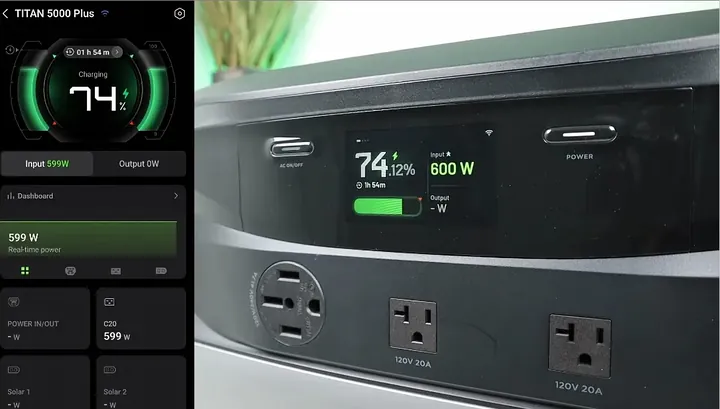
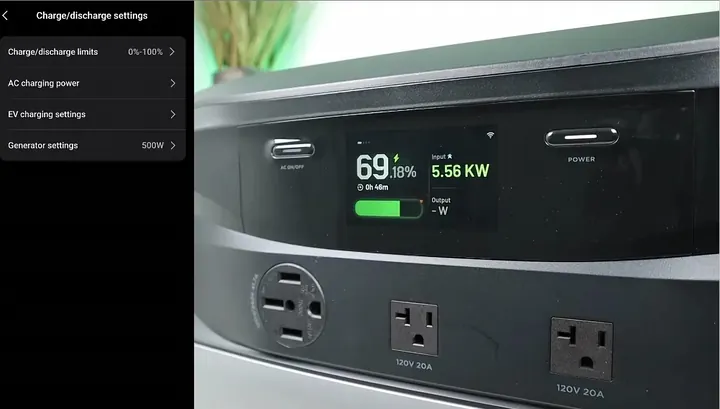
I just hooked up the 120-volt AC charging cable. Now, if you dive into the settings menu, specifically 'charging and discharging,' then 'AC power,' you can fine-tune the AC charging wattage right through the app. That’s a nice feature. Right now, it's set to 600 watts. Let's bump that up to 1200 watts.
After saving the setting, you see the input power jump to 1.2 kW almost immediately. No lag at all. I went back in and increased it further to 1800 watts, then saved it again. Sure enough, the display showed it climbing to around 1730 watts. So yeah, that C20 port offers fully adjustable AC charging power, from a low of 600 watts all the way up to 1800 watts. It works like a charm.
Next, I switched over to 240-volt charging. I plugged the 240-volt adapter into the station and went back to the settings. It was still showing 600 watts, so I cranked it up to 3000 watts and hit save. The display confirmed the 3000-watt input. The power source I'm using can push up to 6000 watts, so I decided to go for broke and set the charging to 6000 watts. Now, the total input claim is 7600 watts, which is honestly a bit unreal. Look at that. It quickly jumped up, but then scaled back down. It struggled to maintain the full 6000 watts.
Assessing 240V Charging Voltage Drop and Pass-Through Output
Turns out, I was getting some voltage drop in my cable run, probably because I was using a pretty long extension cord. The system sensed that voltage sag and automatically backed off on the charging power to protect itself. You really need to be close to your power source if you want full 240-volt charging, but even with the drop, it was still pulling almost 4000 watts. That's pretty decent.
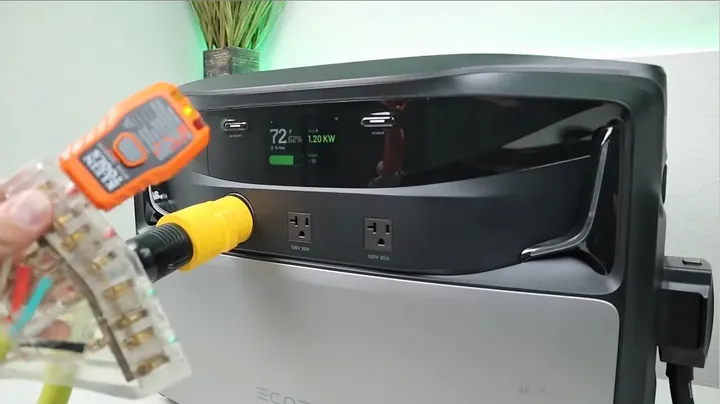
Next, I wanted to see if the unit could output both 120 and 240 volts while simultaneously charging from a 120-volt input. So, with 600 watts of 120-volt charging going in, I checked the 120-volt output. Yep, it's there. Then I checked the 240-volt output. Okay, power on one phase. I flipped the internal switch to the other phase. The indicator light came on. Yes, it's supplying both. So, you get full 240-volt and 120-volt output even when it's charging from a 120-volt input. That’s convenient.
Then I repeated the test with a 240-volt charging input. I'm pulling power from the 240-volt input now. First, check the 120-volt output. Yep. The indicator LEDs aren't always perfectly synchronized, but it kicks on. Then I moved to the 240-volt output. Checked one phase, then the other. Both good. So, no matter if you're charging from 120 or 240 volts, you still get both 120-volt and 240-volt output. That's a solid pass.
X-Fusion Pass-Through Overload Capability
For this Titan test, I wanted to confirm the pass-through charging worked right, especially under heavy load. I had it charging from a 120-volt input, pulling nearly 1800 watts. Then I fired up one of my electric heaters, which draws about 1400 watts. The big question was, what happens if the load exceeds the 1800-watt charging input?
Would the station be smart enough to keep charging at 1800 watts while still powering the higher load, or would it just shut down the charging or the inverter entirely? Honestly, cheaper power stations usually just cut everything off if you draw more than the charging input. It’s a pain in the ass.
But EcoFlow stations typically feature X-Fusion technology, which is designed to handle this exact scenario, allowing a higher output load than the charging input.
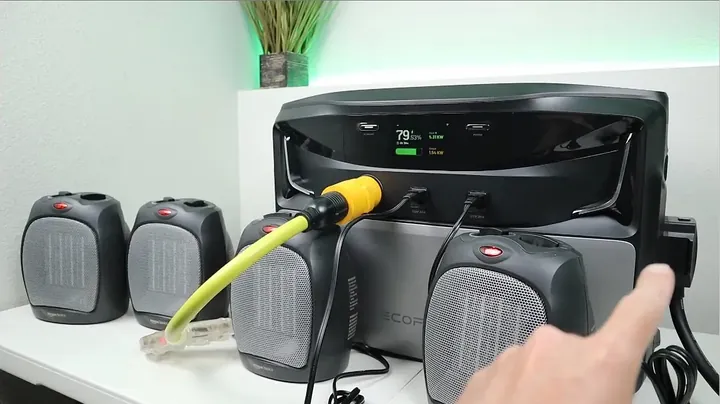
Looking at the screen, we were charging at almost 1800 watts, with the heater pulling 1400 watts. Then I turned on a second heater. The output jumped to just over 3000 watts, while the charging input held steady at 1800 watts. Everything kept running.
This means you can draw a bigger load than your charging input, and the system keeps going. That’s exactly what I expect from an EcoFlow station. Next, I wanted to run a similar test, but with a 240-volt input and an even bigger load. We were pulling about 5 kilowatts in, with one 1400-watt heater running. Time to really push it.
High-Load Pass-Through and MPPT Startup Voltage
So, I just flipped on all the other heaters. We should see a pretty significant jump in power draw. Boom! It spiked to 6.2 kilowatts, and the input power climbed to 7.1 kilowatts. That's a lot of juice going in for charging and a hefty load coming out. Honestly, that's pretty impressive. Everything just kept working.
Now, let's switch gears to some DC testing. I wanted to figure out the MPPT startup voltage for the solar input. The specs say it handles 40 to 450 volts, but at what voltage does it actually kick in? That matters for real-world solar setups.
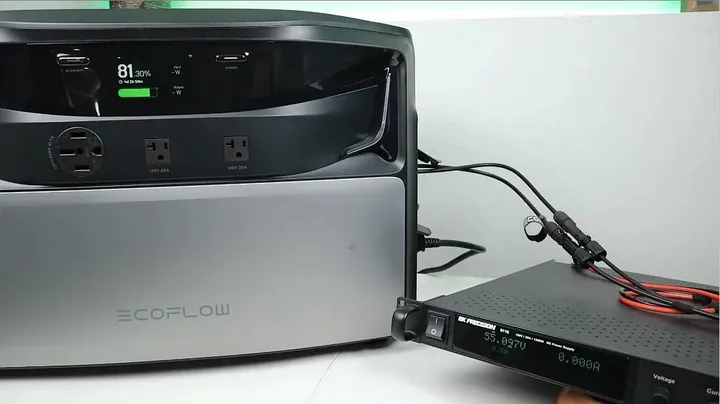
I hooked up my 1200-watt adjustable power supply to one of the solar inputs. I set it to 40.5 volts, which is the bottom end of the spec. I didn't hear any relay click, and the display showed no charging.
So, 40.5V isn't enough. I bumped it up to 50 volts. Still nothing. No action. I figured I'd try 60 volts, or maybe just a little higher to be sure. Let’s try 55 volts, just to confirm. Okay, 55 volts. This is around what you’d see with a 48-volt battery system. Still no go. It just doesn't start. So, I pushed it to 60 volts.
MPPT Controller Startup and Low Voltage Operation
Alright, I heard a little click. That was the relay engaging. There it is. Keep an eye on the screen. Sure enough, the charging indicator popped up. Now we've got input power. So, at 60 volts, pulling almost 16 amps, that's nearly 1000 watts. Specifically, 950 watts of input power. Interesting. It looks like the charge controller needs 60 volts to get started.
So, you'll need at least 60 volts coming from your solar array to kick off the charging process. Good to know.
Now, what happens if we drop the voltage after it’s already started? Will it stop? I dialed it down. Let’s try 55.1 volts. Okay, it's still running. It's still charging. So, 55 volts at almost 16 amps. Let's push it further. I dropped it all the way down to 40 volts, the absolute lower limit of the charge controller's spec.
Look at that. It actually keeps charging, but it starts cycling on and off. It’s definitely on the edge. It's probably right at the disconnect voltage. I nudged it up to 42.1 volts, just to give it a little more headroom. Still a bit intermittent because we’re at the very bottom end of the range, but it is charging. Very interesting. You need 60 volts to start it, but it can maintain charging at a lower voltage.
Dual Charging and Inverter Auto-Restart Functionality
So, it needs 60 volts to kick off the charging, but it'll keep chugging along at lower voltages, down to about 42 volts. That's a useful bit of info. Next, I wanted to confirm the Titan supports dual charging — meaning DC and AC inputs at the same time. I hooked up the 120-volt AC charger and my adjustable power supply to one of the solar inputs. If you look at the screen, you can see both inputs active.
We’re getting about 1000 watts from the solar input and another 1700 watts from the AC. Yep, dual charging works. That’s a real bonus for faster top-offs.
Now, for a critical test: if the power station completely drains, will the inverter automatically turn back on once it starts charging again? I had the unit fully discharged. There's an 'output port memory switch' in the smart app, and I made sure it was activated.
The idea is that it should remember the inverter was on and automatically restart it once the battery reaches a certain charge level. I started charging it, pulling about 1100 watts. The battery level was slowly climbing, but the inverter stayed off. I figured it would kick in around 5% charge. I came back a few minutes later, and sure enough, the battery was almost at 5%. It was slowly ticking up. Give it another minute. And there it is! Right at 5%. The inverter automatically re-enabled itself, just like it should. That’s a good feature if you want continuous power.
Finally, I checked the AC charging efficiency. Starting from zero, I tracked the total energy consumed using the built-in watt-meter. It took 5670 watt-hours to fully charge the 5017 watt-hour battery. That translates to about 88.4% charging efficiency. Solid.
Real-World Solar Charging Performance
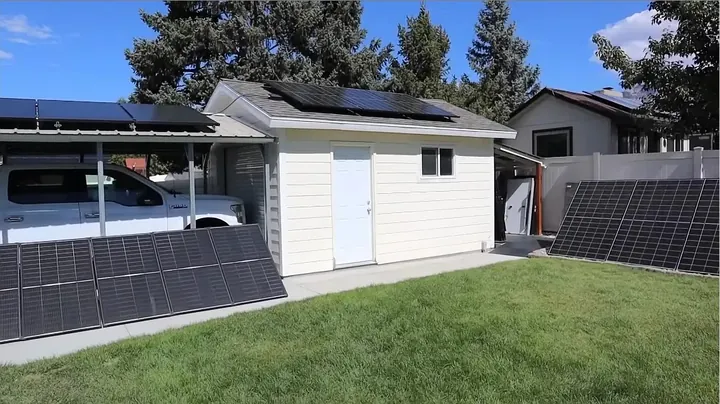
I was really looking forward to putting the Titan power station's solar capabilities to the test. This unit is rated for a whopping 8000 watts of input through its two 4000-watt charge controllers. Honestly, I don't have the kind of massive solar array needed to max this thing out. My setup is smaller. So, I connected my two biggest solar arrays: a 1350-watt array on my shed roof and a 1600-watt array on my carport. We'll see what we get.
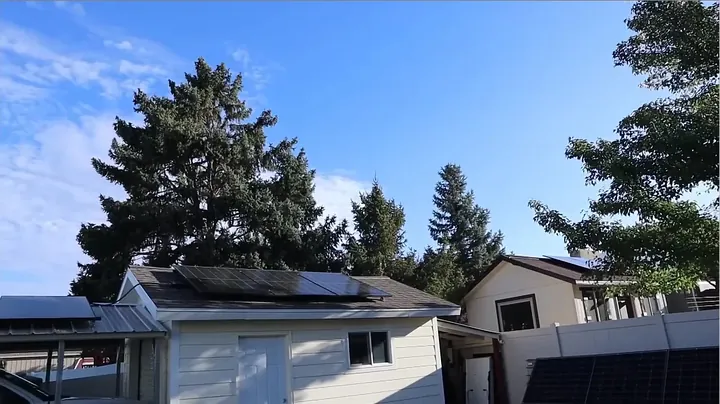
Today's solar conditions weren't perfect. It's late summer or early fall, about 29 degrees Celsius (84°F), with some scattered clouds, and the sun is already lower in the southern sky. So, the panels aren't directly angled for peak power, but we should still get a decent haul. After hooking up both arrays to the power station, the display showed just over 2600 watts, specifically 2.66 kilowatts. That's pretty good output from those panels given the time of year and the cloud cover.
I'm actually in the process of upgrading my solar setup. I've already swapped some panels for CalSun 450-watt bifacial panels, and once I get the rest updated, I'll be able to string them in series for a much bigger array. That'll be a fun test for a future video. For now, 2.66 kW is solid. The station had been charging for about 10-15 minutes, and I noticed the fans were definitely audible, running at a decent clip for that charging speed.
I also tested leaving the solar panels connected to the Titan overnight. In the morning, as soon as the sun started to peek over the mountain, the station began charging automatically. No issues there. You can just leave your panels plugged in.
Grading the Titan 5000 Plus Performance
After all those tests and charging demos, I gotta say, I'm seriously impressed with the Titan 5000 Plus. For a brand-new product, it performed really well. I didn't find any major flaws. EcoFlow's backing this unit with a 5-year warranty, which is a good sign. They're also rolling out a new accessory, the Smart Home Panel 10.
This is a simplified smart transfer switch that's compatible with the new Titan series, basically a smaller, more streamlined version of their existing smart panels. If you're looking for a package deal, definitely check out the bundles that include the Smart Home Panel 10.
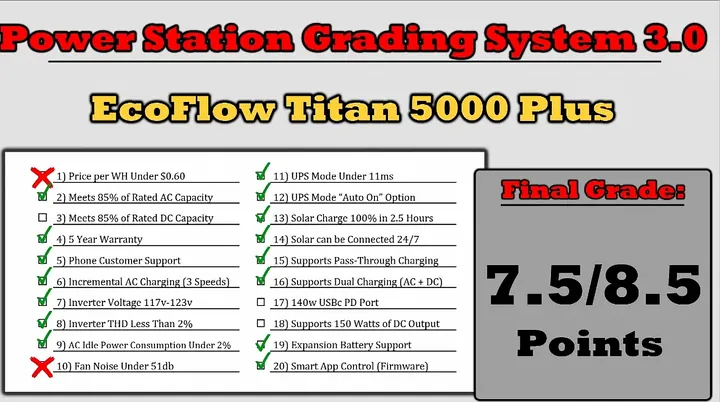
Now, for my power station grading system. You'll see the results on screen for the Titan 5000 Plus.
Since this is a specialized home backup system, three categories don't apply: DC capacity, USB ports, and 150-watt DC output. So, it's graded out of 8.5 points instead of the usual 10 for a standard portable power station. Out of the remaining criteria, the station missed the mark on two points: the price per watt-hour (my target is under $0.60/Wh, and I'm guessing this will be around $0.70-$0.75/Wh, but we'll wait for official pricing) and fan noise (my target is below 50 decibels, and it hit 51 decibels at full load). Still, a total score of 7.5 out of 8.5 is actually pretty darn good for this kind of power station. It's solid.
Final Thoughts and Early Bird Offers
It's not every day EcoFlow drops a whole new line of power stations, so the Titan series is genuinely interesting to me. They've got three distinct options: the Titan 5000 Plus, which we covered here, plus the standard Titan and the Titan Classic. Each one seems to hit a different sweet spot, and I'm curious to hear what you all think about them. Let me know which model you think fits your needs best down in the comments.
Right now, EcoFlow is running a pretty sweet early bird deal for the Titan series. If you put down a $50 reservation, you'll snag a 5% discount on the unit itself, get two free 220-watt solar panels, and save $300 on Smart Home Panel 10 installation services.
That's a pretty good incentive. If you want more details, I've got links in the video description. Thanks for watching and for always supporting the channel. I'll throw up a few other videos you might like. Until next time, I’ll catch you later.
⚠️ CAUTION: SAFETY WARNING!
Always exercise extreme caution when working with high-voltage electrical systems, especially 240V split-phase power. Ensure all connections are secure and properly grounded to prevent electrical shock or equipment damage.
Summary & Tips
The EcoFlow Titan 5000 Plus proved itself a capable home backup solution, delivering on its promises for high power and flexible charging. Its inverter performance is top-notch, keeping sensitive electronics safe even during switchovers. While it missed a couple of minor grading points, the overall package is robust and well-engineered. For anyone looking for serious home power without the full-blown grid-tied cost, this unit is a strong contender.
📋 FAQ
❓ What is the maximum output power of the EcoFlow Titan 5000 Plus?
The Titan 5000 Plus inverter can deliver up to 10,000 watts of output power. This high capacity allows it to handle substantial loads, making it suitable for backing up multiple home appliances simultaneously. During testing, it even peaked over 10,500 watts before its overload protection kicked in, which is impressive surge capability.
❓ Does the Titan 5000 Plus support expansion batteries?
Yeah, it does. The Titan 5000 Plus is designed to be modular, supporting battery expansion up to a total of 30 kilowatt-hours. This means you can significantly increase your energy storage capacity by simply connecting additional battery modules, extending your backup time during longer outages. The modules stack nicely, too.
❓ What is the UPS switchover time for the Titan 5000 Plus?
The UPS switchover time for the Titan 5000 Plus is incredibly fast, clocking in at just 7.4 milliseconds. This rapid transition from grid power to battery power is critical for sensitive electronics like computers and medical equipment. It ensures that devices connected to the power station won't experience disruptive power interruptions during a blackout.
❓ Can the EcoFlow Titan 5000 Plus charge from both AC and solar simultaneously?
Absolutely. The Titan 5000 Plus supports dual charging, meaning you can plug in both AC power and solar panels at the same time. This hybrid charging capability allows for faster replenishment of the battery, maximizing your charging efficiency, especially when time is of the essence. It's a smart setup.
❓ What is the minimum voltage required to start solar charging on the Titan 5000 Plus?
Honestly, the MPPT charge controller on the Titan 5000 Plus needs at least 60 volts to initiate solar charging. While the specifications state a wider operating range, you won't see any power going in until your solar array hits that 60-volt threshold. Once it's started, though, it can maintain charging at lower voltages, down to about 42 volts.
Disclaimer: I purchased all tools for this guide with my own money to ensure an unbiased review. This post contains affiliate links, meaning I earn a small commission if you make a purchase at no extra cost to you.