I built this bench power supply to end the frustration of digging through scrap bins for mismatched wall adapters on every electronics project. A discarded ATX computer power supply provides solid +12V, +5V, and +3.3V rails straight off the board without hassle. Adding an SK120 buck-boost converter gave me clean, variable output from 0 up to 24 volts with built-in current limiting protection. It beats paying commercial lab equipment prices every day of the week.
⚡ Quick Guide: How to Make It in 12 Steps
- Clean ATX chassis and cut harness.
- Jump green wire to ground wire.
- Design custom front panel in browser.
- Print front panel and face components.
- Melt brass threaded inserts into plastic.
- Fasten printed side frame with screws.
- Route main power wires with caution.
- Wire module, binding posts, and switch.
- Trim wire clutter and snap shut.
- Probe rail voltages with a multimeter.
- Dial voltage gently on simple diode.
- Power LED cube under heavy load.
📋 In This Article
- Technical Specifications & Components
- Tools & Materials Used — what you will need for this project
- Tear Down and Clean the Old ATX Power Supply
- Bypass the PC_ON Signal and Test Base Voltage Rails
- Generate the Custom Enclosure in PSU Enclosure Studio
- 3D Print the Bezel and Fit the Front Components
- Install Melt-In Brass Threaded Inserts with a Soldering Iron
- Assemble the Printed Frame Around the Metal Casing
- Prep the Main Power Leads and Observe Critical Polarity
- Wire the Module, Output Posts, and Auxiliary Rails
- Trim the Harness Clutter and Secure the Enclosure
- Validate Fixed and Variable Rails with a Multimeter
- Perform Initial Load Testing on a Bare Diode
- Stress Test the Power Supply with an LED Cube Load
- FAQ
📊 Technical Specifications & Components
| Base Platform | Standard ATX Computer Power Supply Unit |
| DC Converter Module | SK120 Constant Voltage / Constant Current Buck-Boost |
| Variable Output Range | 0.0V to 24.0V DC |
| Fixed Output Rails | +12V DC (Yellow), +5V DC (Red), +3.3V DC (Orange) |
| Common Return | 0V Ground / Chassis Earth (Black) |
| Turn-On Logic | PS_ON (Green wire) strapped directly to Ground (Black) |
| Output Terminals | 4mm safety banana binding posts |
| Frame Fasteners | Salvaged machine screws seated in melt-in brass threaded inserts |
| Front Enclosure Design | PSU Enclosure Studio parametric web application |
| Enclosure Additions | Integrated AC rocker cut off switch |
📊 Project Overview & Costs
🔧 Difficulty Level: Medium bench assembly
⏱️ Time Investment: DIY: 4-6 hours bench work | Pro: 1.5 hours assembly
💰 Professional Service Cost: $180 - $250 commercial unit retail
💡 Verdict: Conversion of surplus PC power supply hardware with low-cost buck-boost circuitry yields cost savings exceeding $120 compared against baseline commercial variable benchtop units.
🛠️ Tools & Materials Used
• Salvaged ATX computer power supply unit
• SK120 DC-DC buck-boost converter board
• 4mm panel-mount banana binding posts
• AC rocker power isolation switch
• M3 brass heat-set threaded inserts
• Reclaimed metric machine screws
Step-by-Step Guide
Tear Down and Clean the Old ATX Power Supply
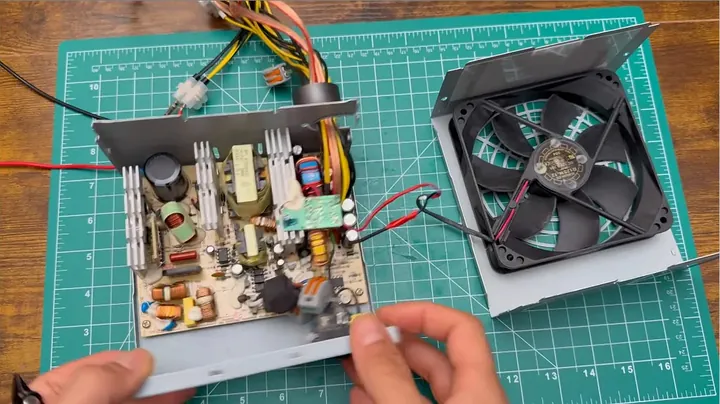
I pulled the sheet metal cover off and found years of packed shop grime coating the board. Filth everywhere. Any unit pulled out of a retired office tower will have lint welded across the transformer windings and aluminum heat sinks. Before reaching inside, I let the board sit disconnected so the big primary filter capacitors had time to bleed down their stored charge. Taking a hit off high-voltage mains caps will ruin your afternoon.
I grabbed a stiff bristle brush and hit the chassis with compressed air to clear out the debris. Looking through the wire bundle, standard ATX color coding applied throughout. Yellow delivers the +12V rail, black provides chassis ground return, and green handles the PS_ON switching logic. I clipped off the extra drive leads and molex connectors to free up precious room inside the chassis.
Bypass the PC_ON Signal and Test Base Voltage Rails
Getting an isolated ATX supply to spin up without a motherboard comes down to one simple connection. I bridged that single green lead directly over to an adjacent black ground wire. Simple jumper. The internal supervisor chip registers that ground connection as a run signal and boots up the primary switching rails. Once I connected the wall cord, the cooling fan started humming right on cue.
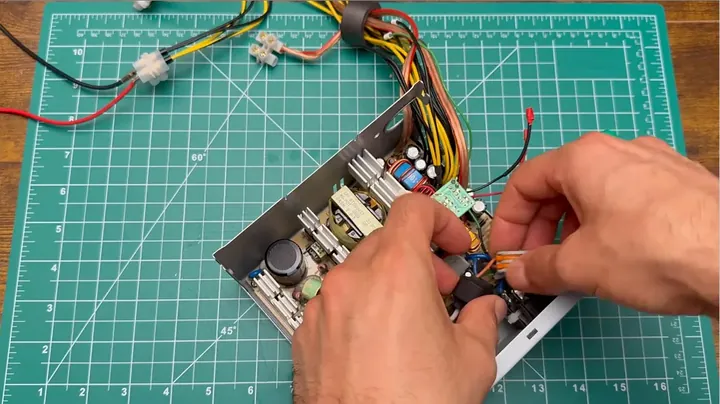
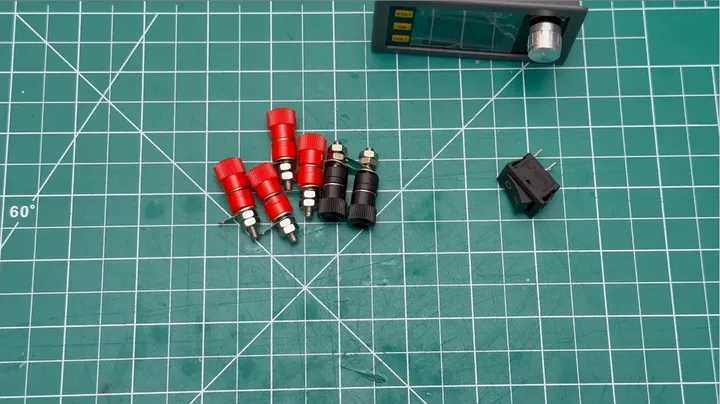
I pulled out my digital multimeter to meter the stripped output conductors against common ground. The yellow lead showed a steady 12.0 volts, the red conductor measured clean 5.0 volts, and the orange wire sat right at 3.3 volts. Every fixed rail held steady without requiring an artificial dummy load on the board. Once the core supply passed inspection, I laid out the upgrade parts on the bench: the SK120 buck-boost regulator, panel-mount 4mm binding jacks, and an AC rocker switch.
Generate the Custom Enclosure in PSU Enclosure Studio
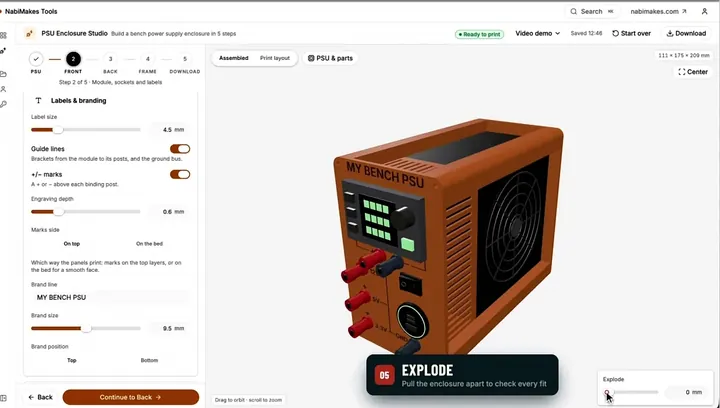
Generic 3D-printed enclosure files off public repositories almost never match the odd mix of parts on my bench. Standard community designs proved useless for this specific casing. Rather than fighting mismatched parts, I opened the PSU Enclosure Studio web tool hosted over at nabimakes.com. That browser CAD program let me dial in the exact millimeter measurements of my sheet metal housing, panel cutouts, and hardware modules.
I positioned the binding posts, added debossed reference text across the face, and checked the fit in the three-dimensional exploded view. Each structural piece drops flat onto the build plate so you do not have to fight messy overhang supports. Once the digital dimensions matched my digital calipers, I exported the finished STL files.
3D Print the Bezel and Fit the Front Components
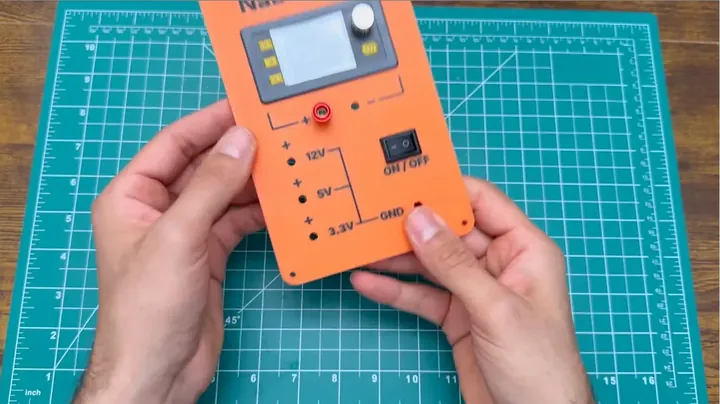
I sent the front panel code to my 3D printer and immediately hit a wall in the shop. My older printer quit working right in the middle of the run. Complete mechanical failure. I had to unpack, assemble, and tram a replacement machine just to get the job back on track. The first completed print came off the bed with crisp layer lines, but the display opening for the buck-boost module came out half a millimeter undersized.
There was no skipping the fix, so I loosened the clearance offset in CAD and ran the print again. Shop work goes that way. The revised bezel finished clean, and the SK120 housing slid straight into the pocket with a firm mechanical snap. I seated the 4mm banana jacks through their mounting holes and pressed the AC rocker switch squarely into its retaining frame.
Install Melt-In Brass Threaded Inserts with a Soldering Iron
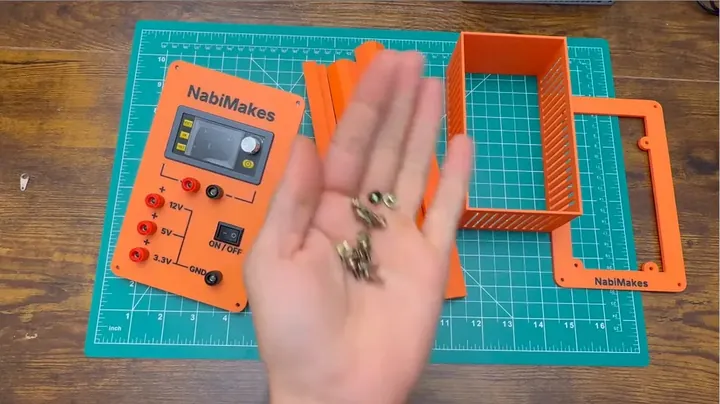
Driving self-tapping fasteners into bare 3D-printed plastic is asking for stripped threads down the road. Poor practice. On bench gear that takes daily abuse, threaded metal joints are essential. I lined up a batch of brass heat-set inserts and warmed up my soldering iron with a conical tip. I set each brass insert squarely above its printed pocket along the perimeter rim.
Pressing down lightly and evenly with the hot tip, I let thermal conduction sink the collar flush into the softened plastic wall. I drew the iron straight upward so molten plastic would not contaminate the internal machine threads. After the plastic solidified around the knurling, the housing gained durable threaded metal anchor points that can take repeated teardowns without slipping.
Assemble the Printed Frame Around the Metal Casing
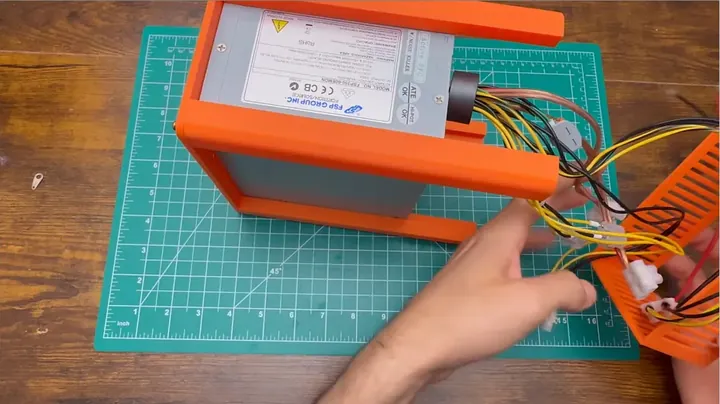
The printed perimeter brackets locked together around the perimeter of the stamped steel chassis like matching puzzle joints. I scavenged all the machine screws from dead office printers I gutted for scrap metal months ago. Saving that hardware in small parts bins pays off since finding miniature metric pan-head screws locally is next to impossible. I slipped the printed side panels over the sheet metal casing flanges. Each salvaged screw threaded directly into its matching brass insert without binding. I tightened the hardware down in an alternating pattern until the plastic structure held the steel chassis securely without crushing any underlying wire insulation.
Prep the Main Power Leads and Observe Critical Polarity
Next, I routed the main high-current DC bundles forward toward the front interface panel. Loose copper strands inside an uninsulated steel enclosure will short out and destroy silicon in an instant. Polarity needs constant vigilance. I stripped each remaining conductor with sharp stripper jaws to expose clean, unbroken copper wire. I twisted multiple ground leads together into a single heavy return bus to spread the electrical load across several board traces. Then I routed the primary +12V yellow wiring directly into the supply terminals of the SK120 converter to provide maximum current flow with minimal voltage drop.
Wire the Module, Output Posts, and Auxiliary Rails
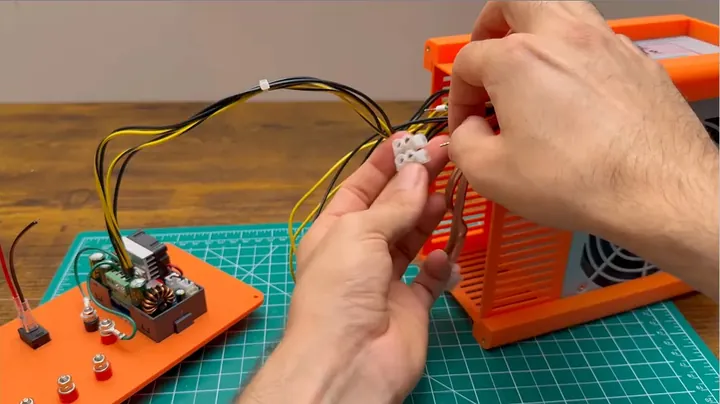
Hooking up the front panel connections took patience and steady hands with the crimper and iron. I ran the regulated DC output conductors from the SK120 board straight to the variable banana jacks. Then I wired individual lines off the fixed ATX rails: the yellow 12V wire landed on its terminal, the red 5V conductor went to its post, and the orange 3.3V lead went to the final position.
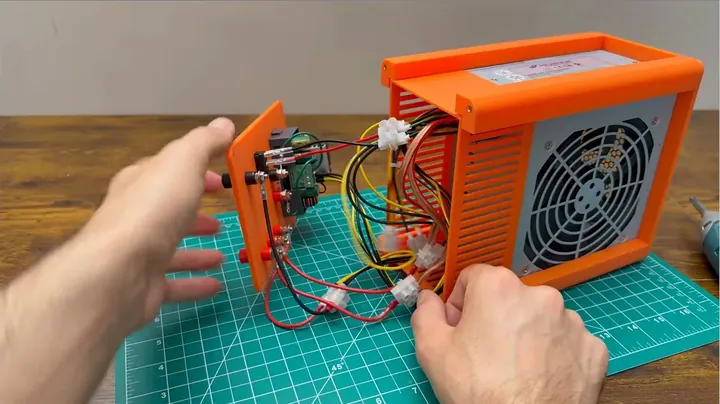
I routed heavy black common ground returns over to each matching negative socket. Next, I wired the AC toggle switch in series with the mains input line to give myself a quick bench cut off switch. By the time I had every termination made, the internal compartment resembled an unmanageable rat's nest. Far too crowded. The rear cover refused to drop down flush against the front bezel face.
Trim the Harness Clutter and Secure the Enclosure
Packing six extra inches of thick copper wiring into a confined plastic bezel was never going to work. I pulled the faceplate back off and clipped every heavy conductor down to the absolute shortest workable run. I stripped the ends fresh, resoldered each terminal, and insulated every exposed connection. The second assembly attempt lined up properly. The front panel slipped flush onto the outer framework without bowing out or pressing conductors against the sharp aluminum heat sinks. I drove the outer mounting screws home to seal the whole front assembly. After plugging in the wall cord, I flipped the main power toggle, and the backlit digital screen on the SK120 snapped on instantly.
Validate Fixed and Variable Rails with a Multimeter
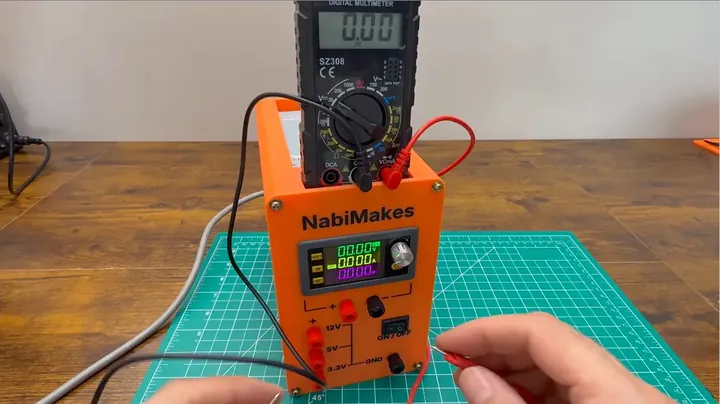
Before risking any sensitive bench project on a converted supply, checking each terminal with a calibrated meter is mandatory. I seated my multimeter test leads into the fixed 12V output: dead on twelve volts. I shifted the probes to the 5V red jack, and the reading settled right inside standard five-percent ATX tolerance limits. I checked the 3.3V post next, and the meter showed clean, unwavering voltage. Lastly, I connected the test leads to the variable terminals driven by the SK120 and rotated the encoder dial. The buck-boost converter climbed evenly from below one volt up past 24 volts with no ripple or voltage spikes. That worked.
Perform Initial Load Testing on a Bare Diode
I never apply unchecked power to a component before verifying that the active current limiting circuit responds properly. I set up a single bare LED on the mat to test the control behavior. Solid-state diodes will fry in an instant if a supply dumps unrestricted current into the junction. I dialed the SK120 down to a low baseline voltage and slowly brought the current limit threshold into play. The LED lit up smoothly without thermal drift or oscillation. Turning the front dial raised brightness steadily while the digital display tracked both output milliamps and rail voltage in real time. The internal control loop performed as expected.
Stress Test the Power Supply with an LED Cube Load
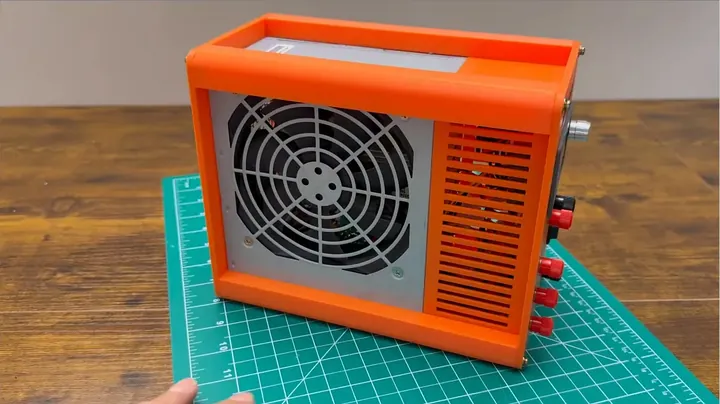
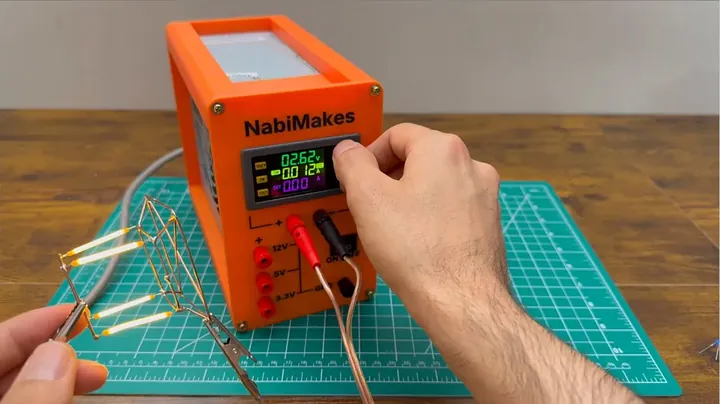
For the full workload test, I hooked up an intricate multi-node LED matrix cube to pull sustained high current off the bench supply. I brought the output voltage upward on the control knob while monitoring the real-time ampere readout on the backlit screen. The illumination across the cube transitioned from a dim red glow up to full, blinding radiance without any flicker. Inside the chassis, the original cooling fan pulled steady air through the enclosure without heating the housing or choking under heavy electrical load. Digging through shop bins for oddball wall-wart adapters every time an idea strikes is finally finished. Pack the tools away. Job complete.
⚠️ CAUTION: SAFETY WARNING!
Hazard Warning: Switched-mode ATX power supplies contain high-voltage electrolytic capacitors retaining lethal electrical charge after mains disconnection. Discharge primary input capacitors fully and verify 0V with a calibrated multimeter before contacting internal circuit board traces.
Summary & Tips
Rebuilding an old desktop power supply into a variable bench source turns useless salvage into a high-utility workshop tool. I now have dedicated fixed logic outputs right alongside a continuously adjustable DC rail delivering zero to twenty-four volts. Installing brass heat-set inserts into the printed bezel gave the enclosure structural durability that easily withstands daily workshop handling and frequent tool bumps. The modification holds up under load, and the bench is cleaner for it.
📋 FAQ
❓ Activation Method: How is an ATX power supply powered on without a computer motherboard?
Logic Activation Procedure: Identify the single green conductor (pin 16, PS_ON signal line) located on the primary 24-pin ATX connector bundle. Connect this green conductor directly to any black chassis ground return line. Pulling this logic line to ground state signals the onboard supervisor IC to initiate switching cycles, activate the cooling fan, and supply voltage across all DC output rails.
❓ Functional Advantage: What benefits does the SK120 converter provide over standard linear voltage regulators?
Efficiency and Regulation Characteristics: Linear voltage regulators dissipate excess voltage differential as thermal waste, requiring oversized cooling heatsinks and restricting enclosure space. The SK120 operates as a high-efficiency switching buck-boost topology module. Utilizing a fixed 12V DC input bus, the converter regulates output continuously from 0.0V to 24.0V DC with integrated programmable current limiting and digital display feedback directly at the front panel.
❓ Fastener Selection: Why install brass threaded inserts instead of threading directly into 3D-printed thermoplastic?
Mechanical Joint Durability: Threading steel machine screws directly into raw 3D-printed plastic layers shears polymer bonds, resulting in stripped holes after minimal assembly cycles. Thermal installation of knurled brass threaded inserts embeds metal threads into molten plastic bosses. This configuration provides high shear strength, structural resistance to torque, and long-term serviceability across repeated enclosure teardown cycles.
❓ Wiring Harness Management: Can unused secondary supply conductors remain inside the chassis enclosure?
Enclosure Space and Safety Considerations: Storing coiled surplus harness bundles inside modified power enclosures obstructs critical internal cooling pathways and creates congestion. Excising unused peripheral, SATA, and legacy drive wiring ensures unrestricted airflow through components and eliminates electrical short risks caused by uninsulated conductor ends contacting grounded metal surfaces.
❓ Minimum Load Requirements: Is operating a switched-mode ATX unit safe without an attached base electrical load?
Switching Stability Parameters: Modern ATX power supply units incorporate active supervisory circuitry capable of stable voltage regulation at zero external load. Older legacy designs occasionally required a dedicated power resistor across the 5V bus to stabilize high-frequency switching rails. The baseline current draw from the SK120 converter circuitry, internal fans, and digital display provides sufficient standby load for continuous rail stabilization.
Disclosure: Tool acquisitions and materials for this guide were independently procured without sponsor compensation. Content contains affiliate tracking links; qualifying commercial transactions generate nominal referral commissions at zero added buyer expense.