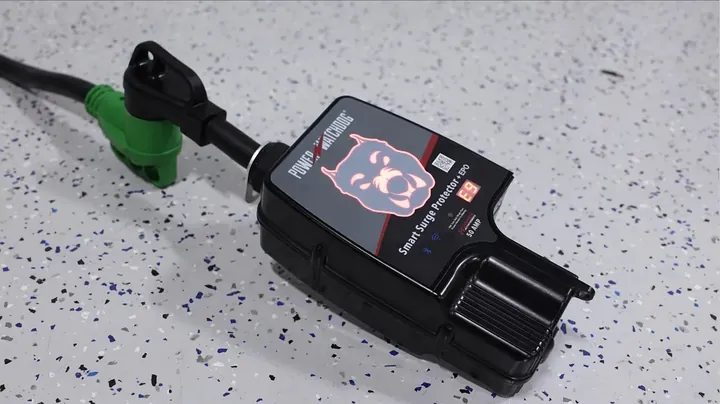
A Power Watchdog surge module replacement is the quickest way to revive an RV surge protector after a nasty grid spike or lightning hit. When that dog face indicator glows solid red and throws an E9 code, the sacrificial metal oxide varistors took the hit to shield your rig. You do not need to replace the entire unit. Swapping the guts takes two screwdrivers and five minutes.
⚡ Quick Guide: How to Make It in 8 Steps
📋 In This Article
- Technical Specifications & Components
- Tools & Materials Used — what you will need for this project
- Identify Fault Code and Required Hardware
- Remove Case Fasteners and Cable Gland
- Split Enclosure and Disconnect Wire Harness
- Seat the Replacement Protection Module
- Verify Color Coding and Secure Terminals
- Reassemble Clamshell and Tighten Cable Gland
- Clear E9 Code and Run Live Power Test
- System Integration and Inverter Considerations
- FAQ
📊 Technical Specifications & Components
| Device Compatibility | Hughes Autoformers Power Watchdog Gen II |
| Supported Form Factors | Portable & Hardwired RV Models |
| Current Ratings | 30 Amp & 50 Amp Variations |
| Fault Indication Code | E9 (Surge Module Compromised) |
| Front Indicator Status | Red Illumination Under Error |
| Terminal Connection Type | Screw-clamp terminal blocks |
| Harness Connector | Multi-pin keyed quick-disconnect clip |
📊 Project Overview & Costs
🔧 Difficulty Level: Easy
⏱️ Time Investment: DIY: 10 minutes | Pro: 5 minutes
💰 Professional Service Cost: $75 - $120
💡 Verdict: Doing this on your own workbench saves you the full cost of buying a whole new surge protector unit.
🛠️ Tools & Materials Used
• Phillips #1 Screwdriver
• Phillips #2 Screwdriver
• Replacement Surge Protection Module for Gen 2 Power Watchdog
Step-by-Step Guide
Identify Fault Code and Required Hardware
Here's the deal with Hughes Autoformers Power Watchdog units: they're designed so you don't throw away a $300 device just because a spike crossed the line. Whether dealing with a 30-amp travel trailer setup or a beefy 50-amp motorhome unit, the inner architecture is virtually identical. Both hardwired and portable units follow this exact modular field-repair format. It's solid. Make sure you order the specific 30A or 50A replacement pack, as the internal metal-oxide varistor ratings and physical terminal layouts differ slightly between ratings. Running the wrong board rating compromises your line protection. Before laying a finger on a tool, visually inspect the plastic exterior for any warping or heat discoloration. A lightning strike carries heavy current, but these internal sacrificial modules are built to take the brunt without cooking the shell. Grab your gear and set up on a clear workbench.
Remove Case Fasteners and Cable Gland
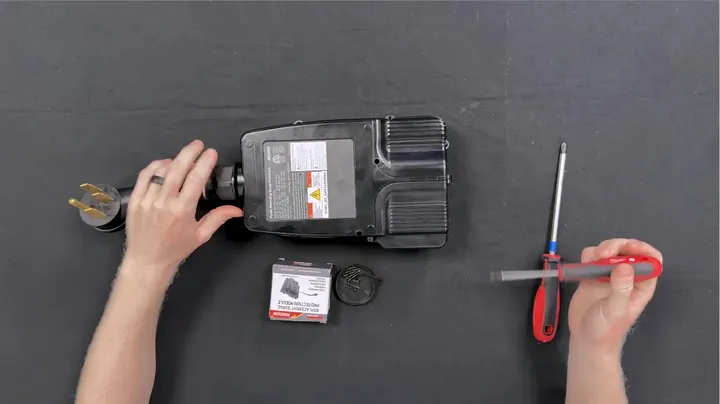
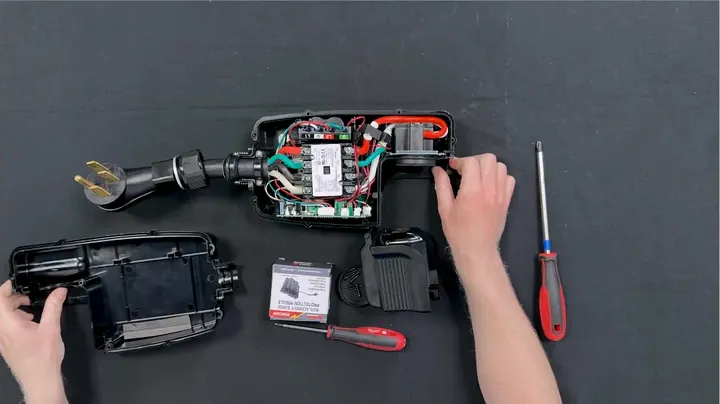
First thing — flip the entire unit over onto a soft shop towel so you don't scuff up the front display lens. You'll need two basic drivers here: a #1 Phillips for smaller hardware and a standard #2 Phillips for the main casing fasteners. Start working around the perimeter. There are eight casing screws holding the two clamshell halves together. Four sit on the outer corners, and the remaining fasteners sit along the recessed body channels. Back all eight screws out completely. Keep them in a parts cup so they don't roll off the bench. Once the fasteners are out, grab the threaded cable gland bushing where the heavy cord exits the housing. Back that threaded compression nut off by hand until the rubber weatherproofing collar loosens up. Done.
Split Enclosure and Disconnect Wire Harness
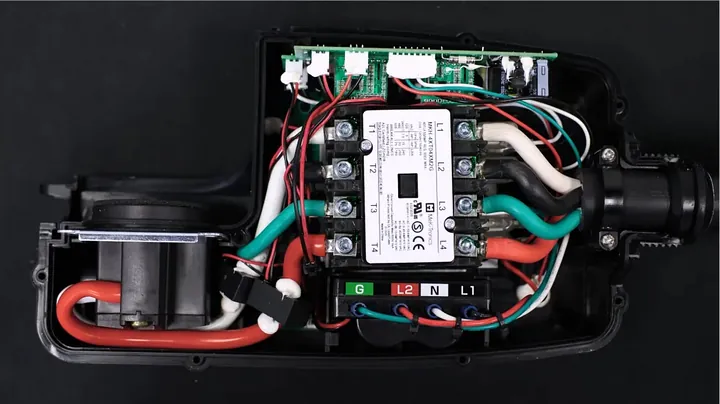
Look, it should go without saying, but make dead certain the surge protector is 100% disconnected from shore power and RV inlet lines before popping the seams. Never service live equipment. Gently pull the top and bottom casing sections apart. The internal rubber weather gasket might fight you a bit, but it separates cleanly without cracking the plastic shell. Inside, you'll spot the sacrificial surge board held tight against the chassis. The board links to the control logic via a small multi-pin wiring harness connector. Squeeze the side release tabs on the plastic plug and pull straight back to disconnect it from the board header. Take care not to yank directly on the thin signal leads. Now grab your #1 Phillips driver. Loosen the four terminal screws clamping down the heavy input conductors. You just need to back them off a few turns until the leads move freely.
Seat the Replacement Protection Module
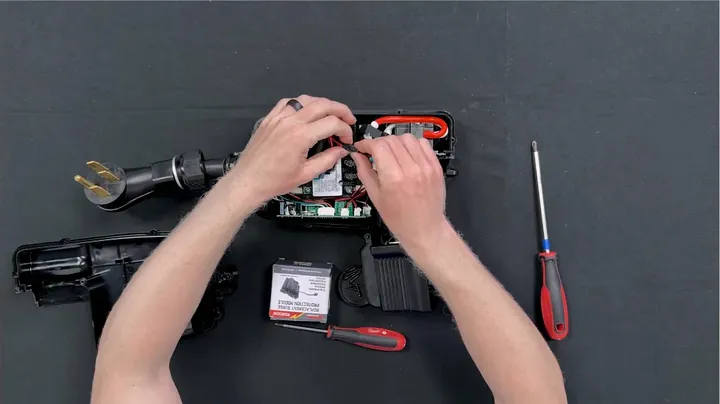
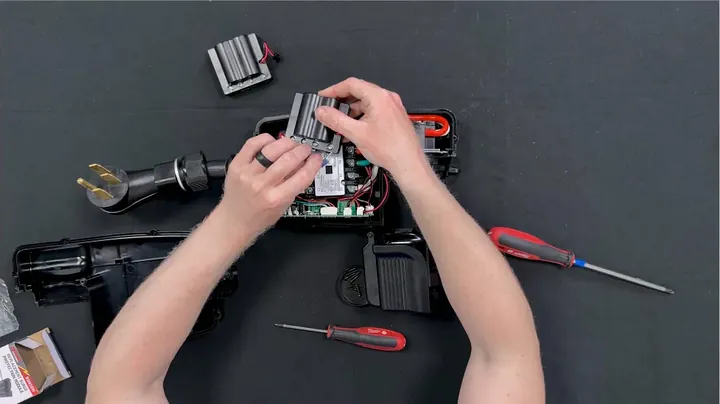
Do not fully remove the four terminal screws from their plastic blocks. Backing them out too far risks dropping microscopic screws into deep crevices of the enclosure, which turns a five-minute fix into a frustrating fishing trip. Once loose, pull the old, toasted surge module straight up and set it aside for scrap. It died protecting the RV. Take your brand-new Gen II replacement module and orient it into position inside the plastic base. Plug the multi-pin logic harness into the keyed socket until you hear a sharp, clean snap. Slide all four heavy conductor leads straight into their corresponding clamp slots. Ensure the copper strands sit completely inside the terminal cages without any stray whiskers splaying out.
Verify Color Coding and Secure Terminals
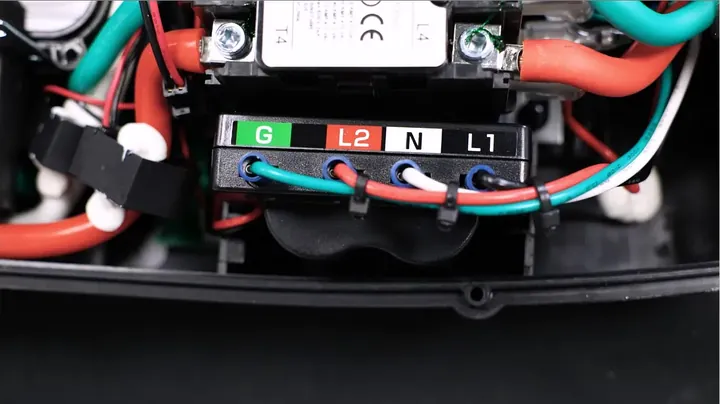
Double-check the wire layout. The circuit board features clear color-coded labeling right on the top silkscreen stickers indicating line, neutral, and ground paths. Make sure your wire colors match those printed markers perfectly. Mismatched phases or swapped neutral leads will trigger internal diagnostic faults right away upon bootup. Tighten all four terminal screws down with firm, steady wrist pressure using the #1 Phillips driver. Give each conductor a gentle tug test. Not budging. That's the whole trick. If a wire slips or wiggles under a light pull, loosen the clamp and reseat it properly. Once secured, guide the surge module down into its mounting slots and tuck the slack wiring neatly along the interior wire channels so nothing gets pinched.
Reassemble Clamshell and Tighten Cable Gland
Ensure no thick copper wires are resting across the screw standoffs. Align the perimeter seal and set the upper housing cover straight down over the base. The shell should mate evenly without forcing it down. If you feel springy resistance, stop and check for a pinched ground lead or bunched signal harness underneath. Drop all eight casing screws back into their recessed holes. Run them down evenly in a crisscross sequence using your #2 Phillips to avoid warping the outer housing edges. Snug them down firmly into the plastic threads without over-torquing. Finally, spin the weatherproofing compression gland nut clockwise back onto the cord entry collar. Tighten it down until the rubber grommet bites the exterior cable jacket to keep rain and road moisture out.
Clear E9 Code and Run Live Power Test
This specific unit came directly from a customer whose rig took a hard hit during a severe regional lightning strike. Right after the storm passed, the unit displayed an E9 error code on its digital segment screen, and the illuminated front canine face turned a steady, ominous red. That's classic behavior when the onboard varistors dump excess line voltage to ground and sacrifice their internal junctions. The surge protection did its job. Now it's time to test our handiwork. Plug the refurbished Power Watchdog back into an appropriate 120V or 240V AC test bench supply. Watch the diagnostic startup cycle run through its delay checks. The bright red error indicator should vanish, the canine face switches over to its normal operational white glow, and the line relay latches shut with an audible click.
System Integration and Inverter Considerations
Back in business. Always verify that both voltage and current readings populate cleanly on your mobile companion app via Bluetooth or Wi-Fi before throwing the unit back into your camper bay. A quick wireless handshake confirms that the internal microcontroller is communicating normally with the newly installed sub-board. One practical heads-up if you are running advanced off-grid electrical gear: combining a Power Watchdog downstream with certain hybrid inverter setups like Victron MultiPlus hardware can sometimes cause nuisance ground-fault tripping or error flags if neutral-ground bonding relays are not properly configured during grid-to-inverter transitions. Make sure your inverter grounding parameters align with the surge protector's internal testing loop. Pack your tools, wipe down the housing, and the unit is ready for the road.
⚠️ CAUTION: SAFETY WARNING!
Disconnect the surge protector completely from shore power pedestal connections and inverter feeds before opening the casing to eliminate the risk of severe electrical shock.
Summary & Tips
Replacing a blown surge module is an easy ten-minute job that saves you from purchasing a whole new protector. The modular terminal setup makes component swapping straightforward with standard hand tools. Always verify terminal screw tension with a firm tug test before sealing the housing. Your Power Watchdog is fully restored and ready to guard your rig against the next spike.
📋 FAQ
❓ What does an E9 error code mean on a Power Watchdog?
The E9 code indicates that the internal surge suppression module has absorbed a critical voltage spike and sacrificed its internal components. That is why the face illuminates red. The surge module must be physically swapped out to clear the fault and restore full protection.
❓ Are the 30-amp and 50-amp replacement modules interchangeable?
Nah, they are not interchangeable at all. The 50-amp model requires a module capable of handling split-phase 120/240V feeds with larger internal components and different wire ratings. The 30-amp module is designed strictly for single-phase 120V circuits. Always match the replacement part directly to your unit's amperage rating.
❓ Do I need to strip new wires during this repair?
Usually, no wire stripping is required. The factory leads already have pre-stripped bare wire or ferrules inserted into the original screw-down terminal blocks. You simply loosen the clamp screws, pull the old board out, slide the existing conductors into the new board, and tighten them down.
❓ Will replacing the surge module void the manufacturer warranty?
Honestly, Hughes Autoformers specifically engineered the Power Watchdog line to allow field replacement of this exact module by the end user. They sell the official modules directly for this very reason. Performing this swap as intended maintains your equipment without hassle.
❓ Why did my Power Watchdog turn red after a storm?
Lightning strikes and utility transformer surges create massive transient voltage spikes on shore lines. The metal-oxide varistors inside the module clamp down on that spike and absorb the hit, preventing your RV appliances from getting fried. The red light alerts you that the sacrificial component is spent and needs replacement.
Disclaimer: I purchased all tools for this guide with my own money to ensure an unbiased review. This post contains affiliate links, meaning I earn a small commission if you make a purchase at no extra cost to you.